
The following instructions show you how to set up your green.ch email address as POP on an iPhone or iPad.
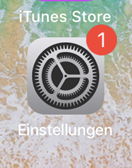
1. Open the settings
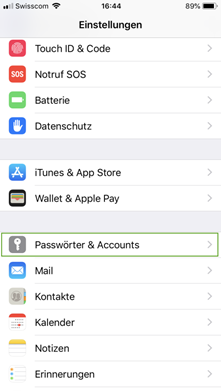
2. Click on «Passwords & Accounts»
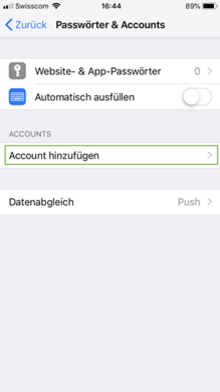
3. Klicken Sie auf «Account hinzufügen» um ein neues Profil zu erstellen.
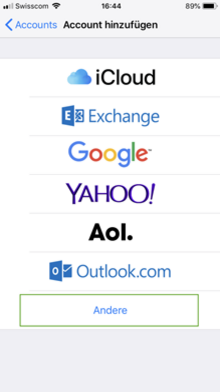
4. Klicken Sie auf «Andere» um Ihre Mailadresse einzurichten.
3. Click on «Add account» to create a new profile.
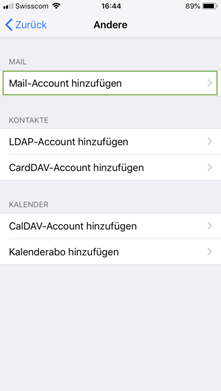
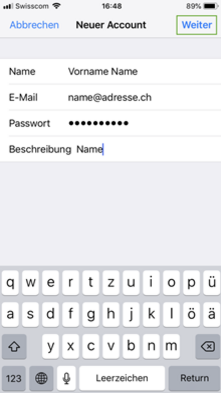
6. Now you can enter your desired mail address and confirm with «Next».
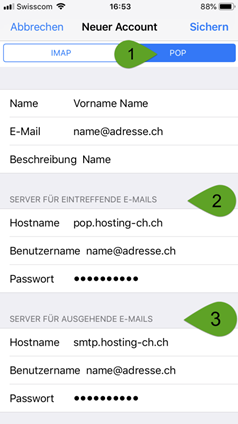
7. Fill in the server settings for the incoming and outgoing server analogous to the example below.
- Please note that the account type «POP» is selected.
- Enter pop.hosting-ch.ch as the host name and your e-mail address as user name and password.
- Enter smtp.hosting-ch.ch as the host name for outgoing e-mails, and your e-mail address as user name and password.
8. Now you can click on «Next» to complete the setup.