
WebTV App - Create Channel List
With the WebTV App, you can create, activate and sort an individual channel list according to your preferences.
Select favourite channels
- Open the menu.
- Select Settings.
- Select Select Favourite Channels.
- Activate the checkboxes of the desired channels.
- If required, activate the Favourite List checkbox to use the list.
Using the checkboxes, channels can be added to or removed from the favourites list.
Define the channel order
- Go back one step.
- Select Select Favourite Channels again.
- Move the channels into the desired order using drag and drop via the arrow buttons.
Step-by-step guide

Go to the menu and select the Settings menu item.

Select the option Select Favourite Channels here.

Using the checkbox behind each channel, channels can be added to the channel list. Using the checkbox behind "Favourite List", you can activate and deactivate the list.

Go back one step in the menu and select Select Favourite Channels.
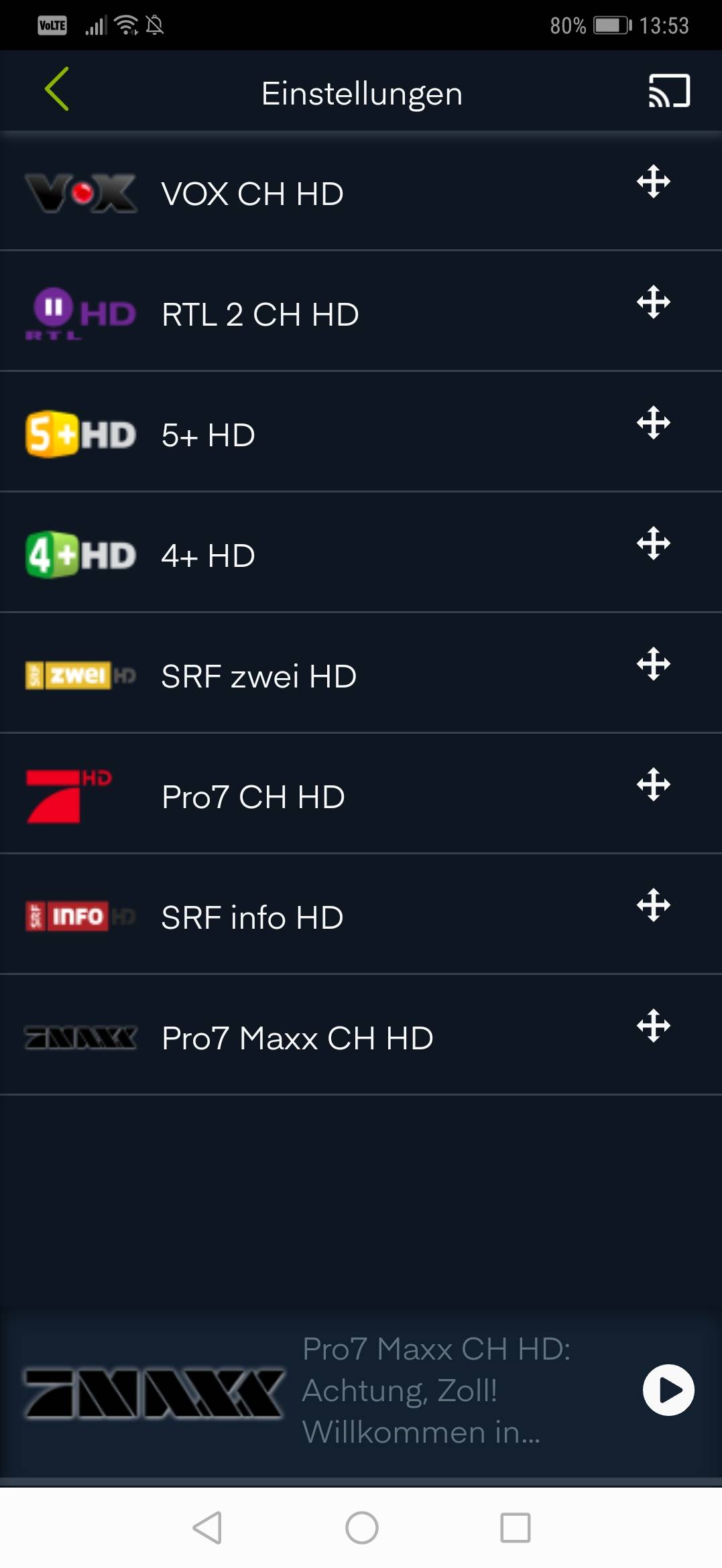
Using drag&drop on the arrow buttons behind the individual channels, you can sort them as desired.

Use the channel list
In the programme guide, the selected channels are then displayed in the defined order.
Related articles
Information about activating WebTV and the app can be found in the following article:
https://www.green.ch/en/greentv-create-login-for-tv-service
General information about Green TV can be found in the following article:
https://www.green.ch/en/general-instructions-green-tv-20