
Block Phone Numbers via the Customer Portal
Via the customer portal my.green.ch you can block individual phone numbers or entire number ranges.
Block an Individual Phone Number
- Log in to the customer portal.
- Open the Telephony section.

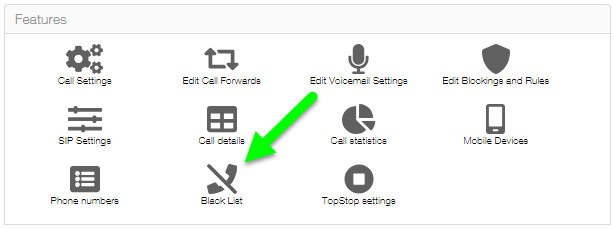
Now select the icon Black List:
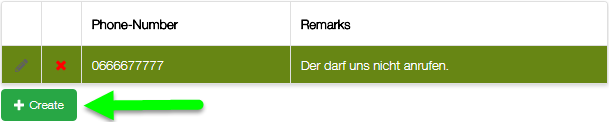
To create a new black list entry, press the button create:
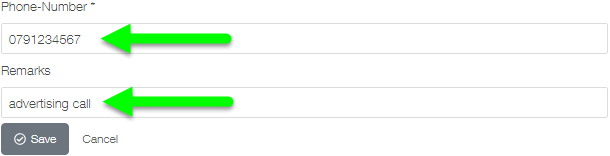
- Enter the phone number to be blocked.
- Add a note if required. The note is for your own reference only and is optional.
- Save the entry.
Block Entire Area Codes or Number Ranges
You can also block all phone numbers that begin with a specific sequence of digits.
For example, you repeatedly receive calls from the following phone numbers:
- 0900111123
- 0900111234
- 0900111345
- 0900111456
- 0900111567
The common part of these phone numbers is:
0900111
Add the character sequence . to the end of this sequence of digits.
This results in the following combination:
0900111.
If you enter this combination in the phone number field when creating a blocking entry, all phone numbers beginning with 0900111 will be blocked.
Related Articles
Further information about the telephony settings can be found in the following article:
https://www.green.ch/en/talk-settings-in-the-customer-portal
Basic information about Green Talk can be found in the following article:
https://www.green.ch/en/talk-installation-and-configuration