
Set Up an Answering Machine from Green
A separate voicemail box can be set up for each Green Talk phone number.
Activate or Deactivate the Answering Machine
- Log in to your customer account.
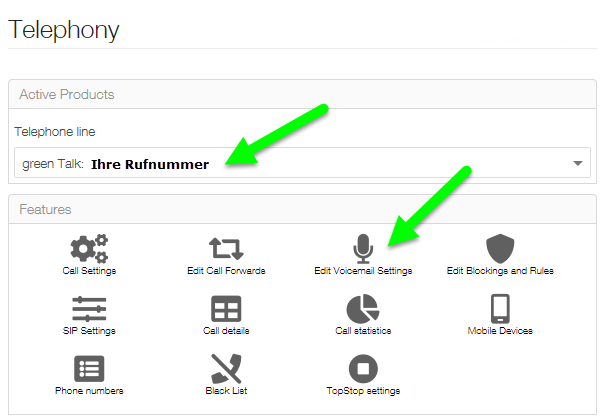
- Open the Telephony section.
- Select the desired VoIP phone number.
- Open Edit voicemail box settings.
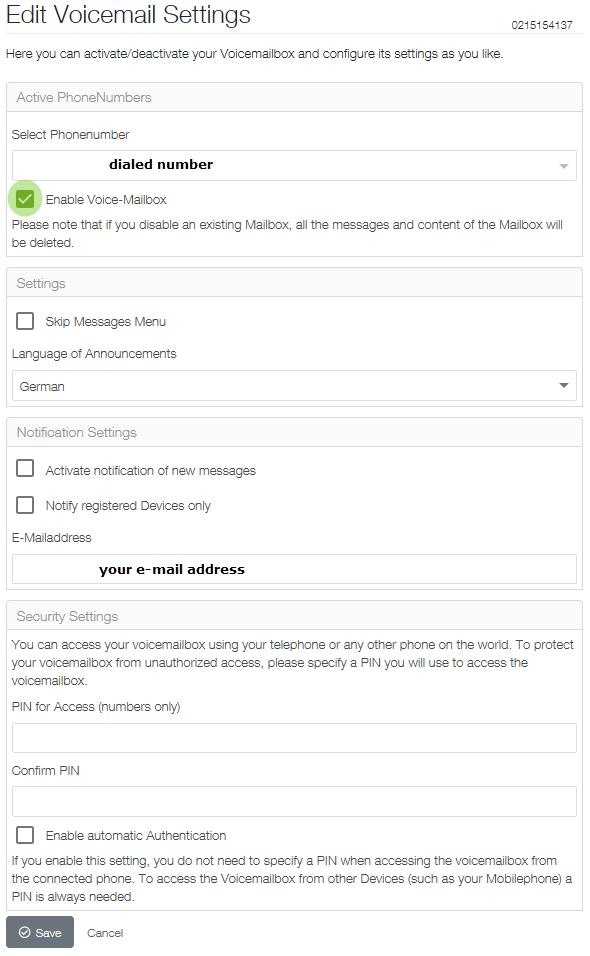
- Activate or deactivate the voicemail box as required.
Note: When an existing voicemail box is deactivated, all saved messages are deleted.
If you only want to stop using the voicemail box temporarily, we recommend setting up call forwarding to another phone number instead.
Further information about call forwarding can be found in the following article:
Access the Answering Machine
Once activated, the voicemail box can be accessed using the prefix 086 followed by the 10-digit phone number.
Example: 086 041 455 xx xx
To access it from abroad, use the phone number with the country code.
Example: +41 86 041 455 xx xx
As soon as the announcement or melody begins, you can press the key to go directly to the main menu.
If automatic authentication is not activated, enter the defined PIN code.
Main Menu Functions
In the main menu, you can configure the answering machine functions.
You can also record a personal greeting.
Access Messages from an External Phone
To access messages from an external telephone, press the key after the announcement or melody begins, enter your PIN code and confirm using the # key.
Examples:
086041455 xx xx *1234# from within Switzerland
+4186041455 xx xx *1234# from abroad
Related Articles
Further information about call forwarding and voicemail boxes can be found in the following article:
https://www.green.ch/en/call-forwarding-and-voicemail
Further information about the telephony settings can be found in the following article:
https://www.green.ch/en/talk-settings-in-the-customer-portal
Basic information about Green Talk can be found in the following article:
https://www.green.ch/en/talk-installation-and-configuration